Instagram DM search
How to Search Instagram Messages and Find Older DMs
Instagram can search within supported conversations, while Linkrium can jump to a date inside Instagram history that has synchronized into its contact-based inbox.
- Publication date
- Updated
- Reading time
- 9 min read
- Author
- Linkrium Editorial Team
Checked against first-party documentation on for iOS, Android, Web. Interfaces change and rollouts are staged, so confirm details in your own app version.

On this page20 sections
Finding an old Instagram DM starts with identifying what is actually missing. Sometimes the chat is present but far down the inbox. Sometimes the conversation is under Message Requests or Hidden Requests. Sometimes you remember a word inside a known chat. Sometimes you need a broader record that is better handled through Instagram’s account-export tool.
Instagram’s interfaces change and features can roll out by account. Follow the labels visible in your current app, and do not install a modified client or give an unknown “recovery” service your credentials.
Quick answer#
Open Instagram’s Messages inbox and use its search field to find the person, username, or conversation. Open the chat, select the conversation name or details, and use Search in conversation where it is offered to look for a keyword. On the web, open Messages, locate the chat, and use the conversation controls available to your account.
Instagram does not offer a dependable universal search-by-date control across every DM surface. If you need a larger personal record, request an export through Accounts Center → Your information and permissions → Export your information. An export is not a deleted-message recovery tool.
Decide what you are searching for#
| What you remember | Best first step | Limitation |
|---|---|---|
| Person or username | Search the Messages inbox | Username or account status may have changed |
| Word in a known chat | Search inside that conversation | Availability differs by interface and account |
| Photo, Reel, or link | Open shared content or pinned items | Deleted and unavailable content will not return |
| Approximate date only | Browse around known events or use an export | No universal DM jump-to-date filter |
| Message from a non-follower | Check Requests and Hidden Requests | Delivery controls may have prevented it entirely |
| Deleted or unsent message | Review official deletion rules | Search and exports do not reliably restore it |
Start with the person, not a generic phrase, when possible. Instagram is fundamentally organized around accounts and conversations, and the main inbox search can be more useful for locating a thread than for searching every message body at once.
Find a conversation on iPhone or Android#
- Open Instagram and go to Messages.
- Select the inbox search field.
- Enter the person’s current username, display name, or a group-chat name.
- Open the result and verify the profile before relying on the conversation.
- If no result appears, check Requests and Hidden Requests.
Try both the display name and the @username. People can change usernames and profile pictures. A group chat can also be renamed, so search for a participant if the group title is unfamiliar.
Meta introduced the ability to pin a small number of one-to-one or group chats near the top of the inbox. Pin frequently accessed conversations after you find them, but do not use pins as a substitute for handling pending replies.
Search inside an Instagram chat#
When the conversation is open, select the chat name or details and look for Search in conversation or a search control. Enter a distinctive word and move through the matches supplied by the interface.
Use terms likely to appear exactly in the message:
- a venue, street, or city;
- a product or event name;
- part of a URL or domain;
- a confirmation phrase;
- an unusual spelling;
- a person’s name mentioned in the discussion.
Search matches text; it does not understand the entire decision. Open the result in context and read later replies. Instagram allows sent messages to be edited for a limited time, so a remembered phrase may no longer match the final text. A message can also have been unsent.
If the control is absent, update the official app and check the conversation details again. Do not assume every account receives a feature at the same moment. Use the web interface or an account export as a fallback when appropriate.
Search Instagram DMs on a computer#
On Instagram’s website:
- Sign in through the official Instagram domain.
- Open Messages from the navigation.
- Use the conversation list or inbox search to locate the person or group.
- Open the conversation and inspect its details for search or shared-content controls.
- Use the browser’s page-find command only as a limited aid for text already loaded on screen.
Browser page search is not the same as Instagram message search. It cannot see history that the page has not loaded and may match navigation labels rather than message content. Scrolling to load years of DMs is inefficient and can still miss dynamically rendered content.
Never scan a login QR code, paste a session cookie, or install a browser extension solely because it promises “advanced Instagram DM search.” Such access can expose the account and its conversations.
Work around the lack of date search#
Instagram does not consistently provide a calendar that jumps to a date inside a DM. Use a combination of anchors instead.
Search for an event anchor#
Think of a word tied to the period: a holiday, venue, city, class, username, or project. Search for it inside the known conversation, then browse nearby messages.
Use shared media as a timeline#
Open the chat’s shared photos, videos, and links. Recognizable media can act as a marker near the period you need. Open the item in the conversation where that option is available.
Check your own account activity#
Posts, comments, account-history entries, and other activity from the same period may help identify the right chat or username. Account History is not a DM transcript, but it can narrow the timeframe.
Request an export#
For a legitimate need to review your own information, request a focused export and choose the relevant date range and information types. Search the exported copy locally without uploading it to another service.
Jump to a date in a synchronized Instagram conversation on Linkrium#
If an Instagram account is connected to Linkrium and its supported one-to-one messages have synchronized, open the contact's conversation and choose the calendar control labelled Go to date. Select a day to open the available timeline around that point.
This is a conversation-level date jump, not a report of every Instagram message sent on a date. It does not search Instagram directly, recover content the provider no longer exposes, or extend the history already synchronized into Linkrium. Keyword search and Go to date remain separate controls: use the date jump when you remember when something happened and in-conversation search when you remember the wording.
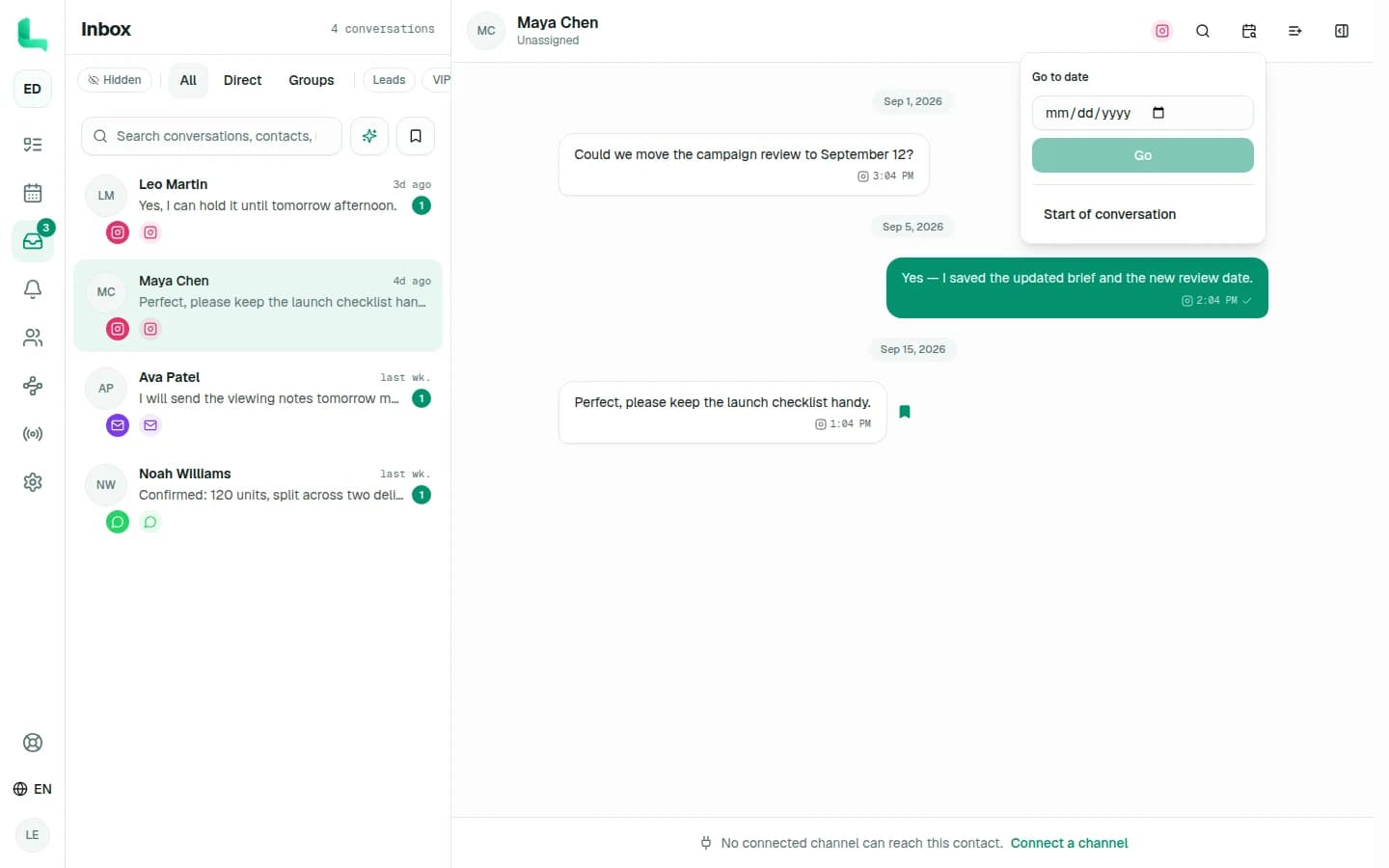
Before relying on the result, confirm the Instagram source badge, contact, timestamps, and surrounding messages. Provider history limits, connection settings, deletion, unsupported events, and synchronization delays can all affect what is available.
Find photos, links, and pinned content#
Open the conversation details to review shared photos, videos, links, or other available content. In 2025, Meta added the ability to pin particular messages, images, memes, or Reels within a one-to-one or group chat, with a documented limit of up to three pinned items per conversation at launch.
Pinned content is a good place for the current address, plan, or reference. It is not permanent preservation: the underlying content can become unavailable, permissions can change, and a participant can unpin an item.
When a decision matters, send a short final text summary. Searchable wording is more dependable than remembering which image contained the information.
Request an Instagram data export#
Instagram places exports in Accounts Center. Current first-party instructions use this general route:
- Open Instagram settings.
- Open Accounts Center.
- Choose Your information and permissions.
- Choose Export your information and create an export.
- Select the Instagram profile.
- Export to a device or an available external destination.
- Choose the information types, date range, format, notification email, and media quality.
- Start the export and retrieve it within the availability window shown by Instagram.
An export can take time to prepare. Store it securely: it may contain personal messages, contacts, media, and information about other people. Delete extra copies after the purpose is complete.
Instagram notes that some deleted information may be retained temporarily for safety and security but will not appear when you access or download your information. It also states that unsent messages are not included in the download.
Troubleshoot missing messages#
Check Requests and Hidden Requests#
Messages from people you do not follow may be routed to Requests depending on your controls. Potential spam or offensive requests can be routed to Hidden Requests without a notification. The Instagram message requests guide covers those locations and settings.
Check restricted and blocked accounts#
Restricting an account changes how its messages are handled. Blocking prevents contact and can affect what you expect to see. Review the profile and privacy controls before concluding that a thread was deleted.
Confirm the correct account#
People often maintain more than one Instagram profile. Check the profile avatar and username associated with the current session. An export must also be requested for the profile that owns the conversation.
Distinguish loading problems from deletion#
If the inbox is not loading, check the official app for updates, try the official website, verify the connection, and check whether Instagram reports a broader service issue. Do not repeatedly delete and reinstall the app when you have not confirmed how the account’s message storage is affected.
Understand unsend and deletion#
If a participant unsends a message, normal search will not recover it. Recently Deleted is documented for several types of account content, but you should not treat it as a guaranteed DM restoration system. Follow the exact options shown in your account and avoid claims from third-party “recovery” sites.
Avoid unsafe recovery tools#
Do not give a recovery website your Instagram password, authentication code, session cookie, backup code, or complete data export. Do not install modified apps that request accessibility access or device storage merely to search messages.
Use Instagram’s official password-protected export for your own information. If a message is important for legal, safety, or account-recovery reasons, preserve the information you can still access and seek appropriate professional or platform support rather than altering the account repeatedly.
Once you find the conversation, reduce future searching: pin the few chats you revisit, pin current details inside them, add clear summary messages, and move genuine commitments to a task or calendar. For a system covering other inboxes too, see how to organize messages across apps.
When native search stops being enough
Start with the app. Go cross-app only when the app is the uncertainty.
Native search is the safest first choice when you know where the conversation happened. If you remember the person or detail but not the network, connect the accounts you use to Linkrium, then test the same distinctive phrase across two synchronized sources.
Frequently asked questions
Can I search Instagram messages by keyword?
Where the current chat interface provides Search in conversation, you can search text inside that specific DM. The main inbox search may prioritize accounts and conversations rather than acting as a complete search across every message.
Can I search Instagram messages by date?
Instagram does not provide a universal jump-to-date filter for every DM interface. In Linkrium, you can open an Instagram conversation that has synchronized into the inbox and use Go to date to open the available timeline around a selected day.
Can I recover Instagram messages that were unsent?
Instagram states that unsent messages are not included in your data download. Do not trust websites or apps that promise to restore them by asking for your password, session, or exported account data.
Why can’t I find an old Instagram conversation?
Check Message Requests, Hidden Requests, restricted accounts, the exact username, and whether you are using the correct Instagram profile. The other person may have changed their username, or the chat or message may have been deleted or unsent.
Official sources
The sources below support the platform behavior discussed in this article.
- 1Meta: Instagram DM editing, pins, and read-receipt controlsabout.fb.com
- 2Meta: Instagram message translation, scheduling, and pinned contentabout.fb.com
- 3Instagram Help Center: Review and export a copy of your informationfacebook.com
- 4Instagram Help Center: What happens to deleted contentfacebook.com
- 5Linkrium: Cross-channel message searchlinkrium.com
Keep reading

Instagram message requests
Instagram Message Requests: Hidden, Missing, and Privacy Controls
Read
Message organization
How to Organize Messages Across Apps: 7 Steps
Read
Message overload
How to Reduce Message Overload Without Missing What Matters
Read
Cross-app message search
How to Find a Message When You Cannot Remember the App
Read